Click to zoom

Transform · Schedule · Route

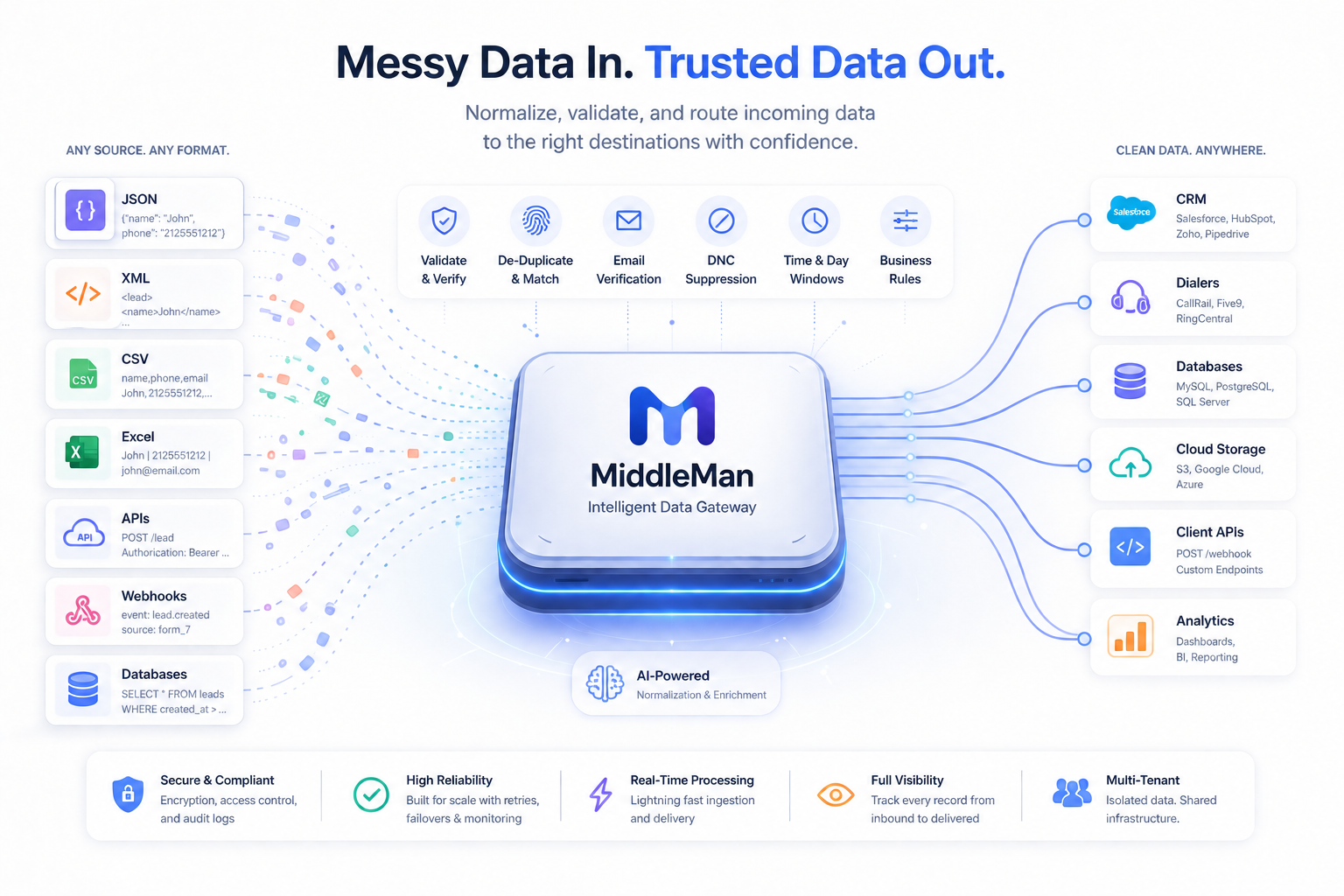
MiddleMan moves records between systems that were never meant to talk.

Pull from a database, an FTP host, a live feed, or a file you upload. Reshape any field in transit with 61 built-in functions, gate every record against your rules, and deliver it in the shape the destination expects.

Schedules run it without you, the assistant builds it with you, and every decision along the way is logged — so nothing moves that you cannot account for.

Start with a 14-day free trial. No credit card required.

61 Transform Functions 7 Database Drivers + FTP/SFTP Scheduled Transfers 28 Audited Assistant Actions
Expressions: Reshape Data In Transit

Compute any destination field instead of copying it. 61 text, number, date, phone and logic functions, previewed live against one of your real records before you save.

Field Maps › Partner Nightly › ƒx
Direct Constant Expression ƒx
// target: full_name concat(title_case(first_name), " ", title_case(last_name)) // target: phone phone_e164(phone)
full_name Maria O'Brien-Smith
phone +15095551234
Scheduled Transfers

Any transfer you can run by hand can run on a cadence — preset or raw cron, in its own timezone. Missed windows are skipped, never backfilled, and repeated failures auto-pause the schedule.

Transfer Schedules
All Transfers Run History Schedules
TransferFrequencyNext run
Legacy Customer Export Daily at 06:00 (America/New_York) Aug 29, 06:00
in 14 hours
Partner SFTP Drop Every 15 minutes Aug 28, 16:15
in 4 minutes
Mainframe Pull Paused 0 */4 * * * Paused after 5 failures
Every Input, Including The Awkward Ones

Uploaded CSV, TXT, XLS, XLSX, PDF and JSON files. Live HTTP feeds. MySQL, PostgreSQL, SQL Server, Oracle, ODBC, LDAP and fixed-width mainframe exports. FTP and SFTP in both directions. Database imports remember their cursor and pull only what is new.

Connections — Create
Connection Name Legacy Customer Export
Connection Type Input - Database
Database Driver Oracle
Database Host db-legacy.internal
Database Port 1521
Database Table SALES.CUSTOMER_EXPORT

Choose the right tier for your team

From solo analysis to enterprise-scale pipelines, MiddleMan has four tiers built for every stage of data operations.

14-Day Trial
Free
No credit card required

Build connections, maps and transfers and run them by hand, at restricted volume, before committing.

  • 2 clients
  • 1 transfers
  • Manual runs (no scheduling)
  • 10,000 input / day
  • 10,000 output / day
Starter Tier
$49/mo
Best for small teams

Core ingest, transformation and routing for focused volumes, with hourly scheduled transfers.

  • 5 clients
  • 10 transfers
  • 2 scheduled transfers
  • 100,000 input / day
  • 250,000 output / day
Professional Tier
$499/mo
For scaling operations

Expanded limits, larger file processing and 15-minute scheduling for multi-client pipelines.

  • 50 clients
  • 500 transfers
  • 10 scheduled transfers
  • 1,000,000 input / day
  • 5,000,000 output / day
Enterprise Tier
Contact Us
Right-fit package

Custom throughput, 5-minute scheduling and dedicated support for compliance-critical teams.

  • 500 clients
  • 5,000 transfers
  • 50 scheduled transfers
  • 250,000 input / day
  • 250,000 output / day

An Assistant That Operates The Platform

28 real actions behind the conversation — not a chatbot describing what you could do next.

It Builds What You Describe

Create a connection, a record format, a field map or a transfer, schedule it, then run it — from a conversation. It also describes, samples, converts, merges, chunks and extracts from CSV, TXT, XLS, XLSX, PDF and JSON uploads.

Middleman Assistant — Conversation
User · 2026-08-28 15:41:06 Map partner_export.xlsx to the Partner Nightly transfer and schedule it for 6am daily.
Assistant · 2026-08-28 15:41:19 The file has 14 columns and 8,412 rows. I created the field map and matched 12 columns to the transfer's record format. Ready to create the schedule for 06:00 daily (America/New_York) — confirm and I will apply it.
Guarded By Design

High-impact changes require explicit confirmation before they apply, destructive actions are denied outright, and tool access is scoped by account tier with admin-only operations removed automatically.

Assistant Tools
Middleman Operational Tools Available: 28
Create Transfer Schedule Enabled
Update Client Api Config Enabled
Update System Control State Admin only
Your Model, Your Audit Trail

11 AI providers are configurable with credentials stored encrypted per account, and every message, tool execution and file touch is logged with a risk score for both the user and administrators.

Administration › Assistant Audit
DateEventToolRisk
15:41 file_uploaded 0
15:41 tool_execution create_feed_map 10
15:52 tool_execution update_system_control_state Flagged (60)

What teams use MiddleMan for

  • Nightly syncs out of an Oracle, SQL Server or mainframe export into a modern destination, unattended
  • Reformatting fields a partner will not change — phone formats, date layouts, padded IDs — without touching either system
  • Suppression, duplicate and verification gates applied consistently across every input, with a log of every decision

Getting started in five steps

From two disconnected systems to a transfer running on its own schedule.

Connect Both Ends

Point MiddleMan at a database, an FTP/SFTP host, a live endpoint, or an uploaded file on the input side, and at wherever the records need to land on the output side.

Map the Fields

Drag source fields onto destination fields. Where the shapes do not match, switch the row to Expression and compute the value instead.

Build the Expression Visually

The builder previews every expression against one of your real records, so you see the exact output before you save.

Set the Gates

Apply validation, suppression lists, duplicate handling, day/time windows, and verification providers so risky records never reach the destination.

Put It on a Schedule

Choose a preset or a cron expression, pick the timezone, and the transfer runs without anyone watching the clock. Run history records every firing.

Frequently asked questions

Answers to common implementation, limits, and onboarding questions.

What can expressions actually do to a field?
Anything you can build from 61 functions across text, number, date, phone, logic and hashing — combine fields, reformat phone numbers to E.164, normalise dates, derive age from a date of birth, pad account numbers, hash an identifier, or fall back to a default when a value is blank.
Do I have to guess what an expression will produce?
No. The builder loads one of your real records and previews the result as you type, and every field the expression reads gets an editable box so you can test a blank, a malformed number, or a missing date before saving. 20 worked recipes are one click away.
How often can a transfer run on its own?
Once at a set time, every N minutes, hourly, daily, weekly, monthly, or on a raw cron expression. Each schedule carries its own timezone, so daily at 06:00 means 06:00 where the data lives. How many schedules you may keep, and how often they may fire, depends on your tier.
Is scheduling included in the trial?
No. On trial you can build connections, maps, expressions and transfers and run them by hand. Automatic scheduling starts on the Starter tier at hourly cadence, Professional allows every 15 minutes, and Enterprise every 5 minutes.
What happens if a scheduled run is missed or fails?
Missed windows are skipped rather than backfilled, and a transfer already in flight is never double-queued. A one-time schedule missed by less than a day still fires. Repeated failures auto-pause the schedule instead of hammering a dead endpoint.
Which systems can MiddleMan read from and write to?
MySQL/MariaDB, PostgreSQL, SQL Server, Oracle, ODBC, LDAP/Active Directory and fixed-width mainframe exports, plus FTP and SFTP hosts in both directions, live HTTP endpoints, and uploaded CSV, TXT, XLS, XLSX, PDF and JSON files.
Do database imports re-pull the same rows every time?
No. Each import remembers its cursor per connection and transfer and pulls only new rows on the next run. You can reset it or reprocess everything when you need to.
What can the assistant actually change?
It has 28 real actions — build a map, create a connection, run or schedule a transfer, convert and import a file, pull a reporting snapshot. High-impact changes require explicit confirmation, destructive actions are denied outright, and tool access is scoped by account tier.
Is AI activity auditable, and can we use our own model?
Every message, tool execution and file upload is logged with conversation linkage and a risk score, visible to the user and to administrators. 11 AI providers are configurable, with credentials stored encrypted per account.
Can expressions reach outside the record?
No, deliberately. The function list is a closed allowlist with no network, filesystem, shell or database access, so a transform can never become a way out of the pipeline.
Over what period are volume limits measured?
Input and output volume limits are measured per day, on every tier. Each day starts you with the full allowance again.
How long is the trial and can we start small?
The trial lasts 14 days at restricted daily volume with no credit card. Most teams start on trial or starter and upgrade as client count, transfer volume and complexity grow.

Start your 14-day free trial today

No credit card required. Connect both ends, map the fields, and watch the first records land.

Start Free Trial
Ask About MiddleMan

Ask us anything about MiddleMan. We are here to help with product questions, onboarding, and finding the right fit for your team.

Ask your first question to start the conversation.
Thinking...